

Authentication
The FairePlace API uses API keys for authentication. Each API key is scoped to your organization (tenant) and controls access to all resources within it.
Creating an API key
Generate an API key from the FairePlace dashboard:
- Log in to FairePlace
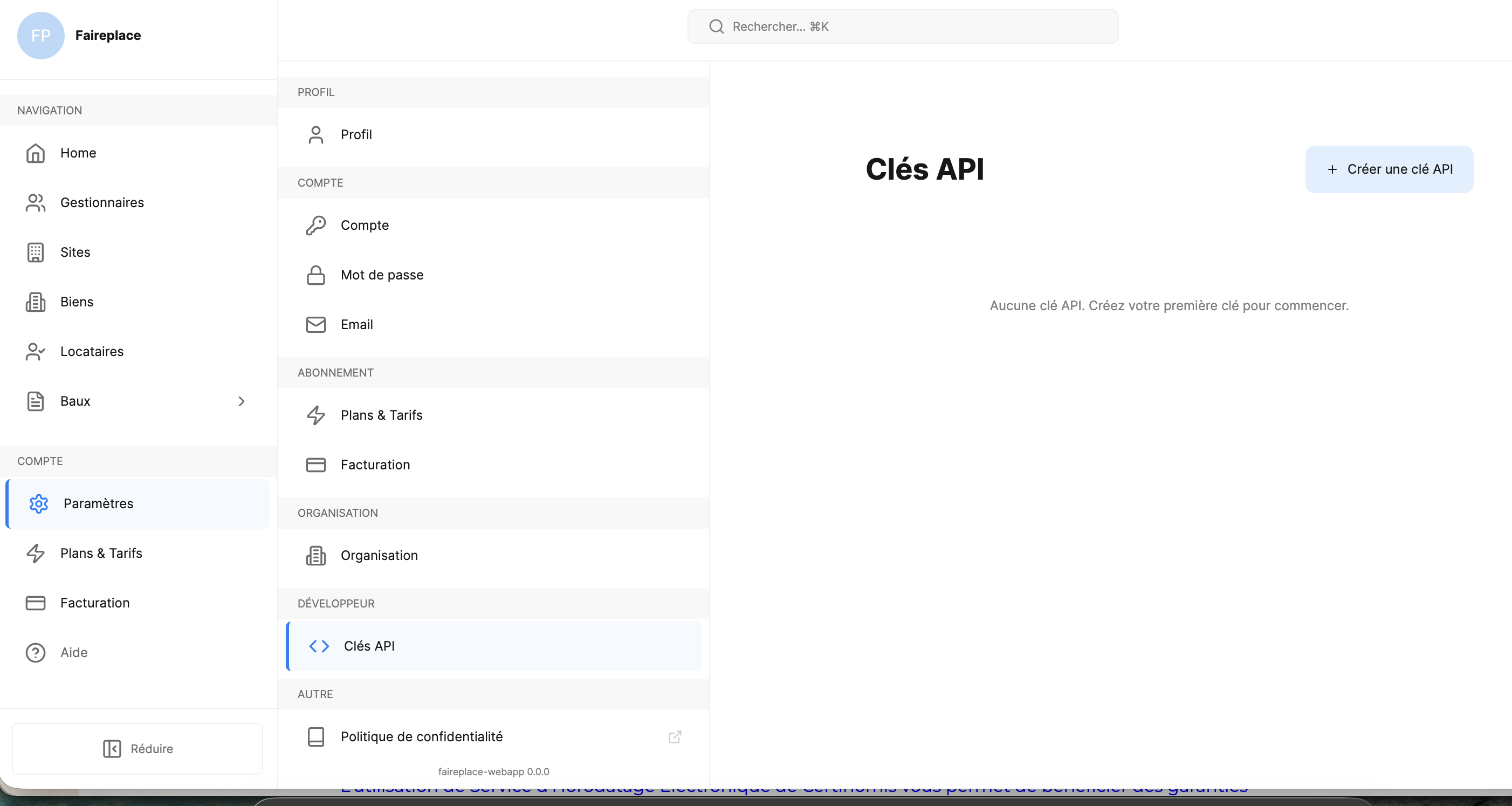
- Go to Paramètres > DÉVELOPPEUR > Clés API
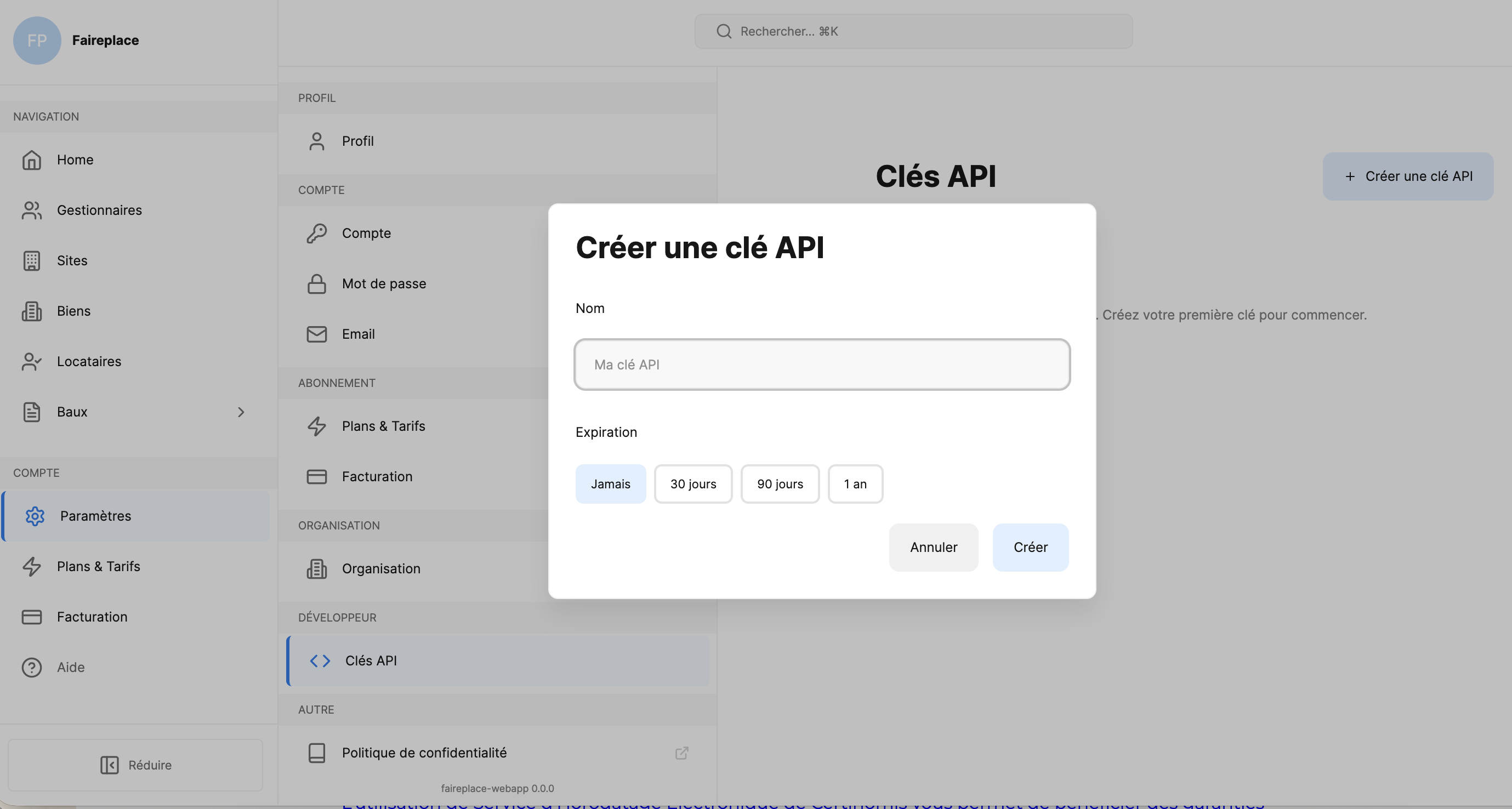
- Click + Créer une clé API
- Enter a Name and choose an Expiration (Never, 30 days, 90 days, or 1 year)
- Click Créer
Important: Copy your API key immediately after creation: it will only be shown once.
Using your API key
Include the API key as a Bearer token in the Authorization header of every request:
Code
Example with environment variable
Store your key in an environment variable for convenience:
Code
Node.js
Code
Python
Code
API key properties
Each API key has the following attributes:
| Property | Description |
|---|---|
| Name | A label to identify the key (e.g. "Production", "CI/CD") |
| Expiration | When the key expires: Never, 30 days, 90 days, or 1 year from creation |
| Created at | Timestamp of when the key was generated |
Managing API keys
You can view and manage all your API keys from the Clés API page in your dashboard settings:
- View: See the name, creation date, and expiration for each key (the key value itself is only shown once at creation)
- Revoke: Delete a key immediately. Any requests using a revoked key will return
401 Unauthorized
Multi-tenant isolation
FairePlace enforces strict data isolation between organizations:
- Every API key is scoped to your organization's
tenant_id - You can only access resources belonging to your organization
- Cross-tenant access is impossible: the API returns
404 Not Found(not403) for resources outside your tenant, preventing information leakage
Code
API key lifecycle
| Event | Action |
|---|---|
| Key created | Store securely, use in Authorization header |
| Key active | Normal API usage |
| Key expired | Create a new key from the dashboard |
| Key revoked | Create a new key from the dashboard |
API Key lifecycle in detail
Creation
- Go to Paramètres > Développeur > Clés API in the dashboard
- Click + Créer une clé API
- Choose a name and expiration period
- Copy the key immediately: it is shown only once
Rotation
To rotate a key without downtime:
- Create a new API key
- Update your application to use the new key
- Verify the new key works in production
- Revoke the old key
Best practice: Schedule key rotation every 90 days for production environments.
Revocation
Revoking a key is immediate and irreversible:
- All in-flight requests using the revoked key will fail with
401 - There is no grace period
- Create a new key before revoking the old one
Permissions
API keys inherit all permissions from the organization. The following permissions control access:
| Permission | Read | Write | Description |
|---|---|---|---|
properties:read | ✓ | View places, estates, rooms, equipment, keys, meters | |
properties:write | ✓ | Create, update, delete properties | |
leases:read | ✓ | View leases, charges, documents, amendments | |
leases:write | ✓ | Create, update leases and charges | |
lessees:read | ✓ | View tenants, contacts, guarantors | |
lessees:write | ✓ | Create, update tenants | |
owners:read | ✓ | View property owners | |
owners:write | ✓ | Create, update owners | |
signatures:read | ✓ | View signature status and proofs | |
signatures:write | ✓ | Initiate signatures, validate OTP | |
credits:read | ✓ | View credit balance and transactions | |
credits:write | ✓ | Purchase credits via Stripe | |
media:read | ✓ | View and download uploaded files | |
media:write | ✓ | Upload photos and documents | |
compliance:read | ✓ | Check rent regulation and rent control | |
types:read | ✓ | List available types (place, estate, room, equipment) | |
webhooks:read | ✓ | View webhook configurations | |
webhooks:write | ✓ | Configure webhooks | |
lessee:leases:read | ✓ | Tenant-side: view own leases |
Note: Permission errors return
403 Forbiddenwith the required permission in the response body.
Rate limiting per key
| Plan | Requests/hour | Burst limit |
|---|---|---|
| Gratuit | 100 | 20/min |
| Starter | 1,000 | 100/min |
| Pro | 10,000 | 500/min |
| Business | 10,000 | 500/min |
| Sur Mesure | Custom | Custom |
Rate limit headers are included in every response:
| Header | Description |
|---|---|
X-RateLimit-Limit | Maximum requests per hour |
X-RateLimit-Remaining | Requests remaining in current window |
X-RateLimit-Reset | Unix timestamp when the window resets |
Retry-After | Seconds to wait (only on 429 responses) |
When rate limited, implement exponential backoff:
Code
Common authentication errors
401 Unauthorized: Missing or invalid API key
Code
Causes:
- No
Authorizationheader provided - Malformed or invalid API key
- Expired API key
- Revoked API key
Fix: Check your API key is correct, or create a new one from the dashboard.
403 Forbidden: Insufficient permissions
Code
Causes:
- Your API key doesn't include the required permission for this endpoint
Fix: Contact your organization admin to adjust permissions.
Security best practices
- Never expose API keys in URLs, logs, frontend code, or version control
- Use HTTPS for all API calls (HTTP requests are rejected)
- Set an expiration: avoid "Never" expiration keys in production
- Use separate keys for different environments (development, staging, production)
- Revoke unused keys: delete keys that are no longer needed
- Handle 401 errors gracefully by prompting for a new key or alerting your team